Making Visual Studio Open Links in Chrome Instead of Edge by Repairing Legacy URL Associations
AI disclosure: This post and its accompanying PowerShell script were written with assistance from AI. The procedure was validated on the environment described below, but should be reviewed and tested before use on other systems. I consider this a hack, though, but know of no better solution.
Overview
On some Windows 11 builds, the Default Apps UI can report Google Chrome as the default browser while applications such as Visual Studio continue to open links in Microsoft Edge.
This appears to occur when Windows has different values in its current and
legacy URL-association records. The Set-LegacyHttpHttpsAssociations.ps1
script checks these records and can create valid legacy UserChoice entries for
applications that still depend on them.
Observed environment
The issue was reproduced with:
- Windows 11 25H2, build 26200
- Visual Studio 2026, version 18.9.2
- Google Chrome registered as
ChromeHTML
The exact behavior may differ on other Windows or Visual Studio versions.
Cause
Windows stores per-user HTTP and HTTPS choices below:
1
HKCU\Software\Microsoft\Windows\Shell\Associations\UrlAssociations
Two user-choice formats were present.
Legacy UserChoice
For example:
1
2
3
...\http\UserChoice
    ProgId = MSEdgeHTM
    Hash   = <protected hash>
The legacy format stores ProgId and Hash as values directly under the UserChoice key.
Current UserChoiceLatest
For example:
1
2
3
4
5
...\http\UserChoiceLatest
    Hash = <protected hash>

...\http\UserChoiceLatest\ProgId
    ProgId = ChromeHTML
The current format stores the ProgID in a child key and uses a separate hash.
In the observed state, Default Apps had correctly written ChromeHTML to
UserChoiceLatest, but the legacy UserChoice either still contained
MSEdgeHTM or was absent. Repeatedly selecting Chrome in Default Apps updated
the current record but did not create or repair the legacy record.
Visual Studio behavior
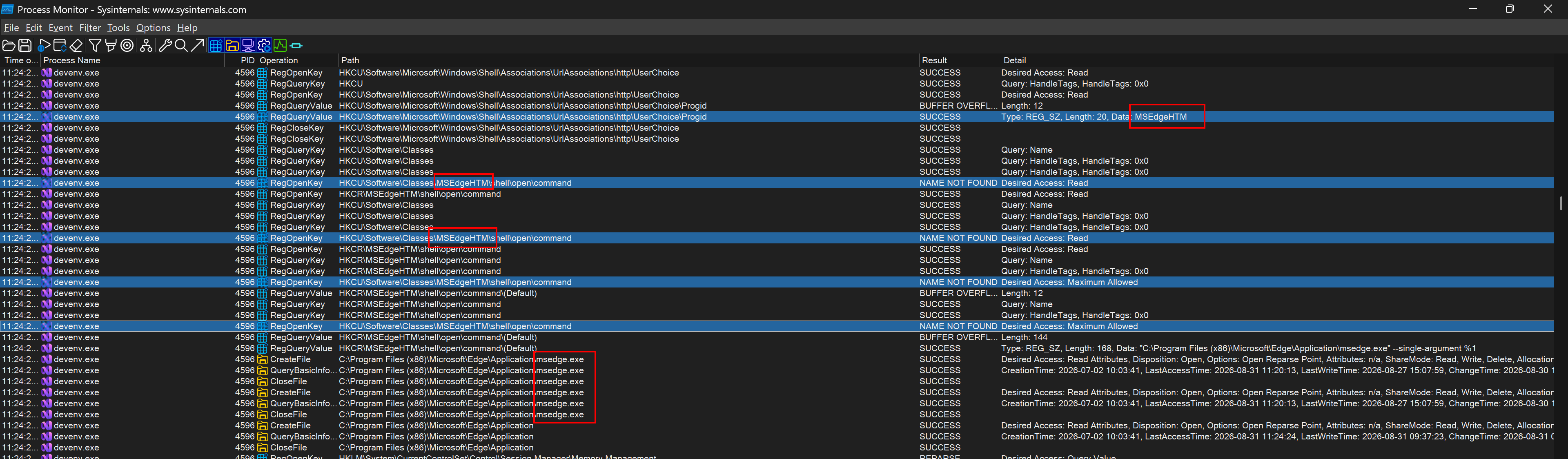
Process Monitor showed that Visual Studio read the legacy record directly during link handling:
1
HKCU\Software\Microsoft\Windows\Shell\Associations\UrlAssociations\http\UserChoice\ProgId
When that value was MSEdgeHTM, Visual Studio resolved:
1
HKCR\MSEdgeHTM\shell\open\command
It then launched Microsoft Edge with the requested HTTP or HTTPS URL. Visual
Studio did not consult UserChoiceLatest in the observed lookup sequence.
When the legacy UserChoice key was absent, Visual Studio could no longer
resolve a browser and did not open the link.
This is a compatibility issue between Visual Studio’s legacy association lookup and the newer Windows user-choice format. It is not caused by Chrome being incorrectly selected in the Default Apps UI.
Why the values cannot simply be copied
Both formats contain protected hashes. The hash is derived from association-specific context, including the protocol, ProgID, user, and registry timing information.
Consequently:
- Copying only
ChromeHTMLinto legacyUserChoice\ProgIdleaves an invalid hash. - Copying the
UserChoiceLatesthash intoUserChoicedoes not produce a valid legacy record. - Direct registry edits may be rejected or removed by Windows.
A legacy hash must be generated specifically for the legacy UserChoice record.
UserChoice Protection Driver
Windows uses the UserChoice Protection Driver (UCPD.sys) to block unauthorized
writes to protected associations such as HTTP, HTTPS, and PDF.
The script reports the UCPD state. It intentionally refuses to set legacy associations while UCPD is running, and it does not disable the driver automatically.
Disabling UCPD reduces a Windows protection boundary and requires administrative privileges and a restart. Only do this when the behavior and security implications are understood. Restore UCPD after creating the required associations.
Script usage
Run commands from the directory containing Set-LegacyHttpHttpsAssociations.ps1.
Check the current state
Check mode is read-only and is the default:
1
.\Set-LegacyHttpHttpsAssociations.ps1
Equivalent explicit command:
1
.\Set-LegacyHttpHttpsAssociations.ps1 -Action Check
The output includes:
- Legacy ProgID and hash
- Current ProgID and hash
- Resolved browser command for each ProgID
- UCPD service state and startup configuration
A repaired Chrome configuration should show ChromeHTML for both
CurrentProgId and LatestProgId for HTTP and HTTPS.
Prepare for changing the legacy choices
If the script reports that UCPD is running, open an elevated PowerShell window and run:
1
2
3
Set-ItemProperty 'HKLM:\SYSTEM\CurrentControlSet\Services\UCPD' -Name Start -Value 4
Get-ScheduledTask -TaskName 'UCPD velocity' -ErrorAction SilentlyContinue | Disable-ScheduledTask
Restart-Computer
The scheduled task may not exist on every Windows build.
After restarting, confirm that UCPD is stopped and disabled:
1
.\Set-LegacyHttpHttpsAssociations.ps1 -Action Check
Set the legacy choices to Chrome
Run:
1
.\Set-LegacyHttpHttpsAssociations.ps1 -Action Set
By default, the script sets both http and https to ChromeHTML.
To set only one protocol:
1
.\Set-LegacyHttpHttpsAssociations.ps1 -Action Set -Protocol https
To use another registered browser, supply its ProgID:
1
.\Set-LegacyHttpHttpsAssociations.ps1 -Action Set -ProgId <RegisteredProgId>
The script verifies that the ProgID has a registered shell-open command before modifying the association.
Hash-generation dependency
Set mode uses the open-source PS-SFTA implementation to generate legacy
UserChoice hashes. The script downloads a pinned source revision rather than
an arbitrary latest version:
1
2
3
Repository: DanysysTeam/PS-SFTA
Commit:     22a32292e576afc976a1167d92b50741ef523066
SHA-256:    3EB6F6DEE3FD8C91604042060B9D658F08EC85D3FD0A14769119DFD78BC30851
The downloaded file is stored under:
1
%LOCALAPPDATA%\LegacyUrlChoice
The SHA-256 value is verified before the script loads or executes the dependency. A hash mismatch stops execution.
The older PS-SFTA implementation is run with PowerShell strict mode temporarily
disabled because it performs dynamic registry-property access that is
incompatible with Set-StrictMode -Version Latest. Strict mode is restored
immediately afterward.
Backups and rollback
Before Set mode writes an association, it exports the existing URL-association registry tree to:
1
%LOCALAPPDATA%\LegacyUrlChoice\Backups
The exact backup path is printed after a successful operation.
Restore a backup with:
1
.\Set-LegacyHttpHttpsAssociations.ps1 -Action Restore -BackupPath '<path-to-backup.reg>'
Restoring imports the complete URL-association tree captured in that backup, not only HTTP and HTTPS.
Restore UCPD
After verifying that Visual Studio opens links in Chrome, restore the UCPD startup configuration from an elevated PowerShell window:
1
2
Set-ItemProperty 'HKLM:\SYSTEM\CurrentControlSet\Services\UCPD' -Name Start -Value 1
Restart-Computer
After restarting, verify both the associations and UCPD state:
1
.\Set-LegacyHttpHttpsAssociations.ps1 -Action Check
The expected result is:
CurrentProgIdisChromeHTMLfor HTTP and HTTPS.LatestProgIdisChromeHTMLfor HTTP and HTTPS.- Current and latest commands resolve to
chrome.exe. - UCPD is running with system-start configuration.
As example here output from a successful repair:
1
2
3
4
5
6
7
8
9
10
Protocol CurrentProgId CurrentHash  LatestProgId LatestHash
-------- ------------- -----------  ------------ ----------
http     ChromeHTML    T9xYpnya5UU= ChromeHTML   5MImDzVyvvI=
https    ChromeHTML    PRVmq3J5FoQ= ChromeHTML   sv1hY5CXXYA=


[http] current command: "C:\Program Files\Google\Chrome\Application\chrome.exe" --single-argument %1
[http] latest command:  "C:\Program Files\Google\Chrome\Application\chrome.exe" --single-argument %1
[https] current command: "C:\Program Files\Google\Chrome\Application\chrome.exe" --single-argument %1
[https] latest command:  "C:\Program Files\Google\Chrome\Application\chrome.exe" --single-argument %1
Finally, restart Visual Studio and test an external link e.g. Open in browser for an active pull request.
Limitations
- The procedure relies on undocumented Windows hash behavior implemented by PS-SFTA.
- Windows updates may change
UserChoice,UserChoiceLatest, hash generation, or UCPD behavior. - The script does not automatically elevate, disable UCPD, restart Windows, or re-enable UCPD.
- The workaround may become unnecessary after Visual Studio adopts the current Windows URL-association mechanism.
Complete PowerShell script
1
2
3
4
5
6
7
8
9
10
11
12
13
14
15
16
17
18
19
20
21
22
23
24
25
26
27
28
29
30
31
32
33
34
35
36
37
38
39
40
41
42
43
44
45
46
47
48
49
50
51
52
53
54
55
56
57
58
59
60
61
62
63
64
65
66
67
68
69
70
71
72
73
74
75
76
77
78
79
80
81
82
83
84
85
86
87
88
89
90
91
92
93
94
95
96
97
98
99
100
101
102
103
104
105
106
107
108
109
110
111
112
113
114
115
116
117
118
119
120
121
122
123
124
125
126
127
128
129
130
131
132
133
134
135
136
137
138
139
140
141
142
143
144
145
146
147
148
149
150
151
152
153
154
155
156
157
158
159
160
161
162
163
164
165
166
167
168
169
170
171
172
173
174
175
176
177
178
179
180
181
182
183
184
185
186
187
188
189
190
191
192
193
194
195
196
197
198
199
200
201
202
203
204
205
206
207
208
209
210
211
212
213
214
215
216
#!/usr/bin/env pwsh
[CmdletBinding()]
param(
    [ValidateSet("Check", "Set", "Restore")]
    [string] $Action = "Check",

    [ValidateSet("http", "https")]
    [string[]] $Protocol = @("http", "https"),

    [string] $ProgId = "ChromeHTML",

    [string] $BackupPath,

    [string] $SftaPath
)

Set-StrictMode -Version Latest
$ErrorActionPreference = "Stop"

$associationsPath = "HKCU:\Software\Microsoft\Windows\Shell\Associations\UrlAssociations"
$associationsRegPath = "HKCU\Software\Microsoft\Windows\Shell\Associations\UrlAssociations"
$sftaCommit = "22a32292e576afc976a1167d92b50741ef523066"
$sftaSha256 = "3EB6F6DEE3FD8C91604042060B9D658F08EC85D3FD0A14769119DFD78BC30851"
$sftaUrl = "https://raw.githubusercontent.com/DanysysTeam/PS-SFTA/$sftaCommit/SFTA.ps1"

function Get-RegistryValue {
    param(
        [Parameter(Mandatory)]
        [string] $Path,

        [Parameter(Mandatory)]
        [string] $Name
    )

    if (-not (Test-Path -LiteralPath $Path)) {
        return $null
    }

    $item = Get-ItemProperty -LiteralPath $Path -Name $Name -ErrorAction SilentlyContinue
    $property = $item.PSObject.Properties[$Name]
    if (-not $property) {
        return $null
    }

    return $property.Value
}

function Get-ProgIdCommand {
    param(
        [Parameter(Mandatory)]
        [string] $Id
    )

    $path = "Registry::HKEY_CLASSES_ROOT\$Id\shell\open\command"
    if (-not (Test-Path -LiteralPath $path)) {
        return $null
    }

    return (Get-Item -LiteralPath $path).GetValue("")
}

function Get-UrlAssociationState {
    param(
        [Parameter(Mandatory)]
        [string[]] $Protocols
    )

    foreach ($item in $Protocols) {
        $currentPath = "$associationsPath\$item\UserChoice"
        $latestPath = "$associationsPath\$item\UserChoiceLatest"
        $latestProgIdPath = "$latestPath\ProgId"
        $currentProgId = Get-RegistryValue -Path $currentPath -Name "ProgId"
        $latestProgId = Get-RegistryValue -Path $latestProgIdPath -Name "ProgId"

        [pscustomobject]@{
            Protocol = $item
            CurrentProgId = $currentProgId
            CurrentHash = Get-RegistryValue -Path $currentPath -Name "Hash"
            LatestProgId = $latestProgId
            LatestHash = Get-RegistryValue -Path $latestPath -Name "Hash"
            CurrentCommand = if ($currentProgId) { Get-ProgIdCommand -Id $currentProgId } else { $null }
            LatestCommand = if ($latestProgId) { Get-ProgIdCommand -Id $latestProgId } else { $null }
        }
    }
}

function Get-UcpdState {
    $driver = Get-CimInstance Win32_SystemDriver -Filter "Name='UCPD'" -ErrorAction SilentlyContinue
    $configuration = Get-ItemProperty "HKLM:\SYSTEM\CurrentControlSet\Services\UCPD" -ErrorAction SilentlyContinue

    [pscustomobject]@{
        State = if ($driver) { $driver.State } else { "Not installed" }
        Start = if ($configuration) { $configuration.Start } else { $null }
        StartDescription = switch ($configuration.Start) {
            0 { "Boot" }
            1 { "System" }
            2 { "Automatic" }
            3 { "Manual" }
            4 { "Disabled" }
            default { "Unknown" }
        }
    }
}

function Show-State {
    $state = @(Get-UrlAssociationState -Protocols $Protocol)
    $state | Format-Table Protocol, CurrentProgId, CurrentHash, LatestProgId, LatestHash -AutoSize

    foreach ($item in $state) {
        Write-Host "[$($item.Protocol)] current command: $($item.CurrentCommand)"
        Write-Host "[$($item.Protocol)] latest command:  $($item.LatestCommand)"
    }

    Write-Host ""
    Get-UcpdState | Format-List
}

if ($Action -eq "Check") {
    Show-State
    return
}

if ($Action -eq "Restore") {
    if (-not $BackupPath) {
        throw "-BackupPath is required for Restore."
    }

    if (-not (Test-Path -LiteralPath $BackupPath)) {
        throw "Backup file not found: $BackupPath"
    }

    & reg.exe import $BackupPath
    if ($LASTEXITCODE -ne 0) {
        throw "Registry import failed with exit code $LASTEXITCODE."
    }

    Show-State
    return
}

$ucpd = Get-UcpdState
if ($ucpd.State -eq "Running") {
    throw @"
UCPD is running and blocks creation of legacy HTTP/HTTPS UserChoice records.
No association was changed.

This script deliberately does not disable UCPD automatically. To prepare the machine,
run the following in an elevated PowerShell window, reboot, and then rerun this script:

  Set-ItemProperty 'HKLM:\SYSTEM\CurrentControlSet\Services\UCPD' -Name Start -Value 4
  Get-ScheduledTask -TaskName 'UCPD velocity' -ErrorAction SilentlyContinue | Disable-ScheduledTask
  Restart-Computer

After setting the choices, restore UCPD with Start=1 and reboot:

  Set-ItemProperty 'HKLM:\SYSTEM\CurrentControlSet\Services\UCPD' -Name Start -Value 1
  Restart-Computer
"@
}

$command = Get-ProgIdCommand -Id $ProgId
if (-not $command) {
    throw "ProgID '$ProgId' has no registered shell open command."
}

if (-not $BackupPath) {
    $timestamp = Get-Date -Format "yyyyMMdd-HHmmss"
    $backupDirectory = Join-Path $env:LOCALAPPDATA "LegacyUrlChoice\Backups"
    New-Item -ItemType Directory -Path $backupDirectory -Force | Out-Null
    $BackupPath = Join-Path $backupDirectory "url-associations-$timestamp.reg"
}

& reg.exe export $associationsRegPath $BackupPath /y
if ($LASTEXITCODE -ne 0) {
    throw "Registry export failed with exit code $LASTEXITCODE."
}

if (-not $SftaPath) {
    $toolDirectory = Join-Path $env:LOCALAPPDATA "LegacyUrlChoice"
    $SftaPath = Join-Path $toolDirectory "SFTA-$sftaCommit.ps1"
    New-Item -ItemType Directory -Path $toolDirectory -Force | Out-Null

    if (-not (Test-Path -LiteralPath $SftaPath)) {
        Invoke-WebRequest -Uri $sftaUrl -OutFile $SftaPath -UseBasicParsing
    }
}

if (-not (Test-Path -LiteralPath $SftaPath)) {
    throw "PS-SFTA source not found: $SftaPath"
}

$actualHash = (Get-FileHash -LiteralPath $SftaPath -Algorithm SHA256).Hash
if ($actualHash -ne $sftaSha256) {
    throw "PS-SFTA source hash mismatch. Expected $sftaSha256 but found $actualHash."
}

Set-StrictMode -Off
try {
    . $SftaPath
    foreach ($item in $Protocol) {
        Set-PTA -ProgId $ProgId -Protocol $item -Verbose
    }
}
finally {
    Set-StrictMode -Version Latest
}

$result = @(Get-UrlAssociationState -Protocols $Protocol)
$invalid = @($result | Where-Object { $_.CurrentProgId -ne $ProgId -or -not $_.CurrentHash })
if ($invalid.Count -gt 0) {
    throw "One or more legacy associations were not written successfully. Backup: $BackupPath"
}

Write-Host "Legacy associations set to $ProgId."
Write-Host "Backup: $BackupPath"
Show-State
That’s all!